1 pattern
For one project
$5.99USD
$5.99 per pattern
Buy 1 patternUpload a black-on-white initial image, then preview a counted DMC chart before you download the PDF.
Upload a photo and see your pattern in seconds. No account needed to preview.
Upload a portrait, pet or landscape. The studio opens with your photo: crop it, choose the size and colours, and check the printable PDF. No account needed until you download.
Rather chart it yourself? Start from a blank grid
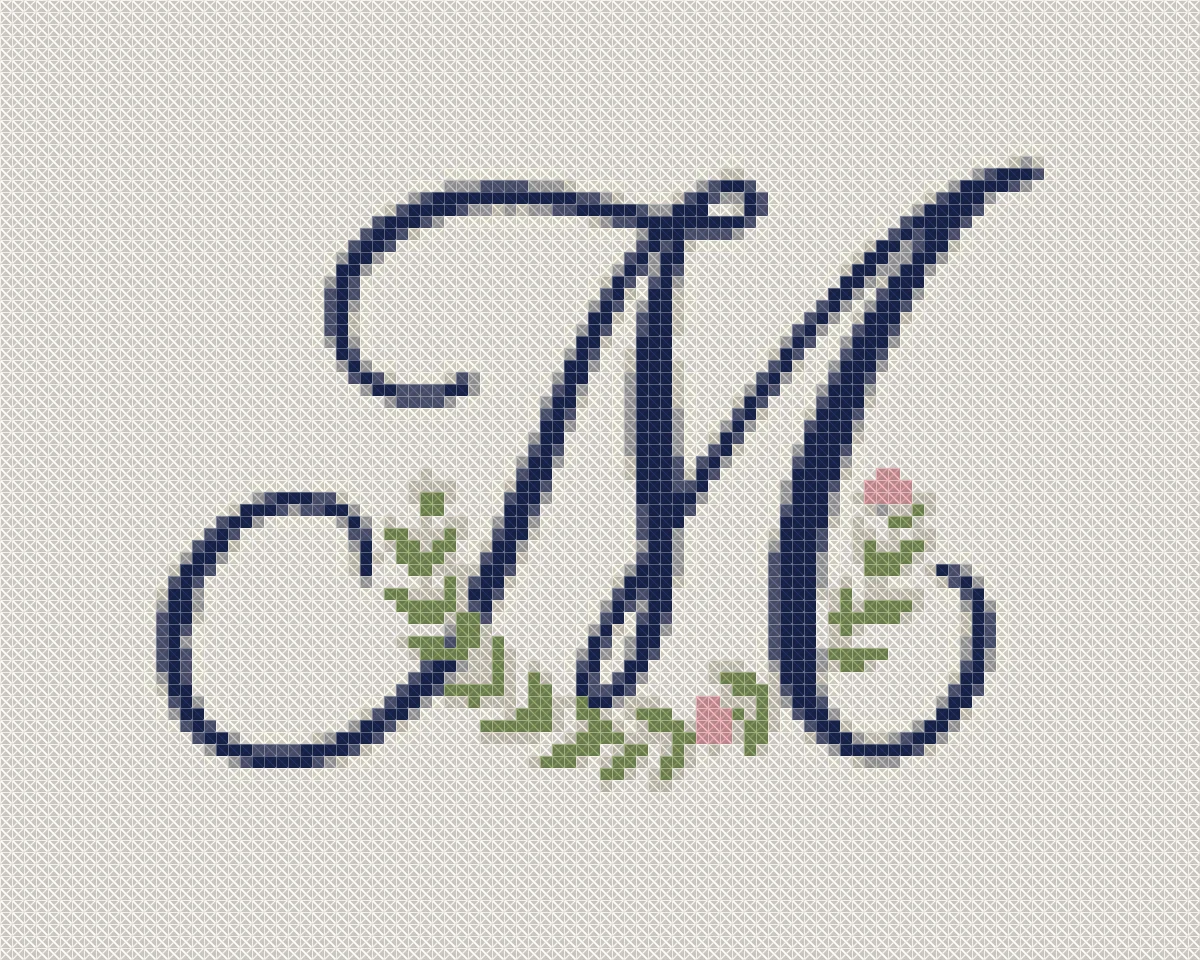
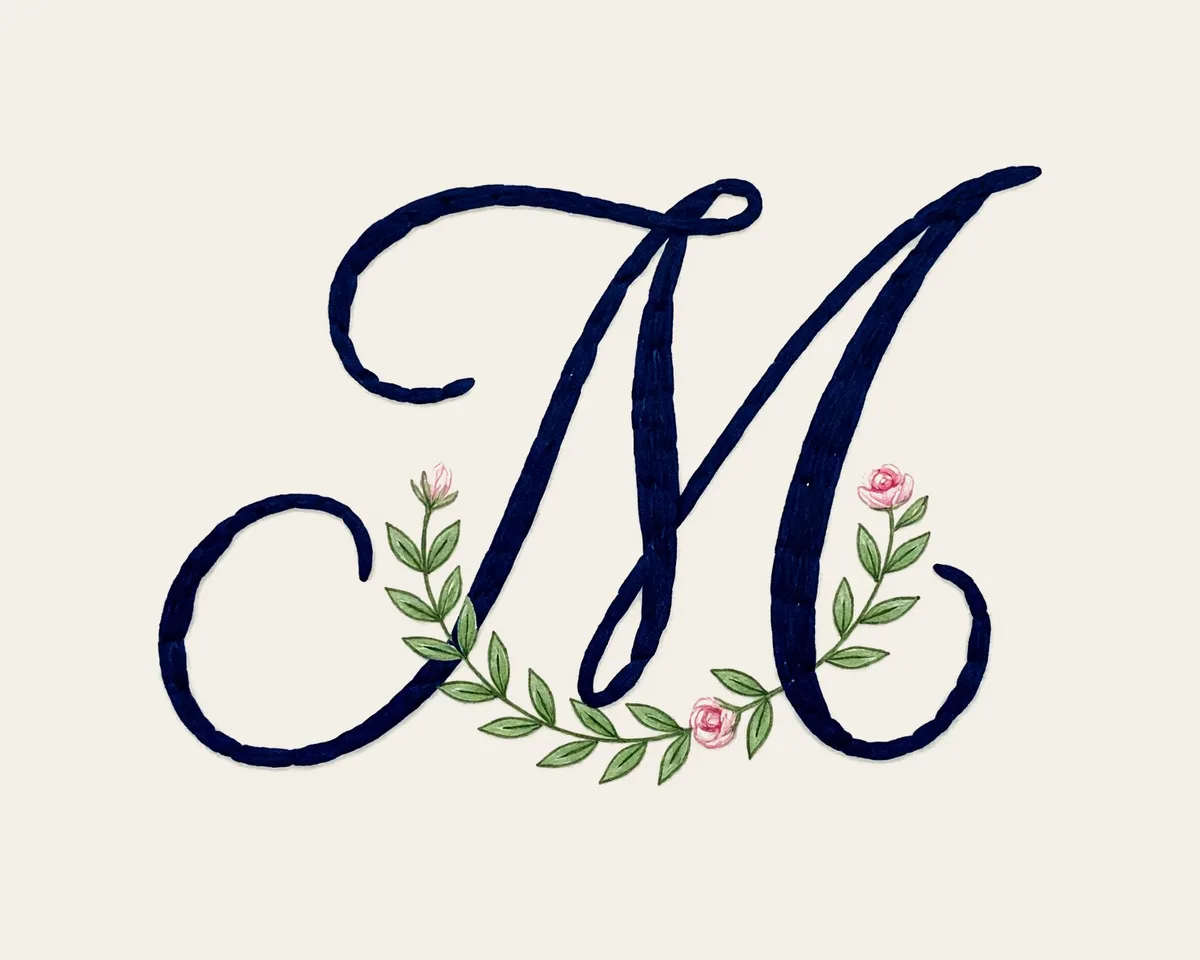
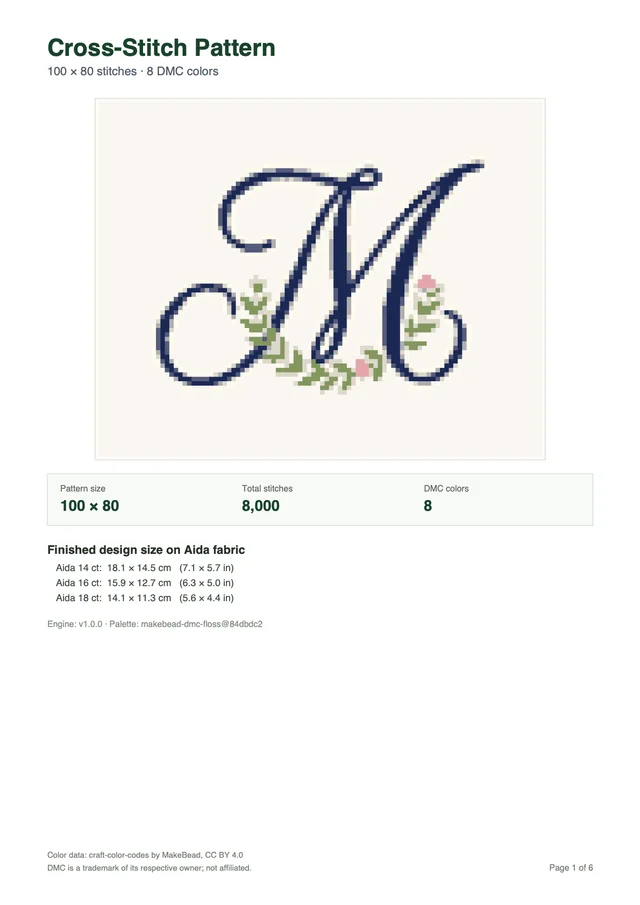
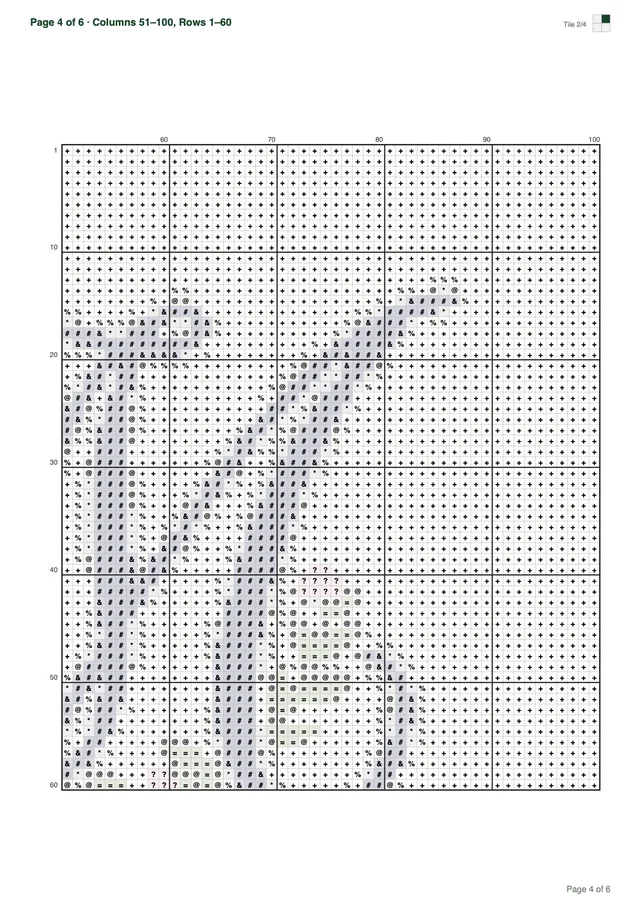
Every download is a multi-page PDF built from your pattern, not a screenshot. This sample was made from the monogram above.
Want a different subject? Browse all 67 free patterns
Previewing is free. You pay only when you download a new pattern.
Your first pattern is free Sign up and get 1 credit. No card needed.
Make my patternFor one project
$5.99USD
$5.99 per pattern
Buy 1 patternOne for you, two to give
$12.99USD
$17.97 if bought one by oneSave 27%
$4.33 per pattern
Buy 3 patternsFor the whole family
$19.99USD
$35.94 if bought one by oneSave 44%
$3.33 per pattern
Buy 6 patternsPrices in USD, excluding tax: VAT or sales tax is added at checkout where it applies. Payments by Paddle, our merchant of record. By buying you agree to the Terms of Service and the Refund Policy.
You make a monogram cross stitch pattern by uploading a crisp initial graphic. The Cross Stitch pattern maker maps your lettering onto a counted grid with solid DMC floss.
Many crafters look for an automated letter generator where they can type their initials and select a script typeface. The Cross Stitch pattern maker works differently because it translates uploaded digital pictures into counted full cross stitches. You can sign up for an account to save your generated charts after testing the free browser preview.
The working path starts on your computer or mobile device. You open any basic graphics software, image editor, or document program to create a black-on-white image of your initials. Using a high-contrast black initial on a pure white background gives the pixel converter sharp boundaries to evaluate. Clean digital artwork prevents ambiguous gray fuzz around letter stems.
Hand-drawn monograms follow the same initial preparation steps. You can draw your letterforms on smooth white paper with a dark felt pen, take a clear photo in bright indirect sunlight, and crop the image tightly around the letters. The generator accepts JPEG, PNG, and WebP files up to 20 MB and 8,000 pixels per side. Sharp lighting ensures that paper shadows do not turn into accidental background stitches.
When you upload an initial image, the software calculates pixel colors across your chosen grid width. Monograms need far fewer colors than landscape or portrait needlework. Restricting your palette to 2 to 8 DMC colors keeps letter strokes solid and readable. Using too many shades creates confetti stitches where single isolated squares scatter along letter curves.
Following an organized preparation routine helps you produce clean charts with sharp letter edges. A structured workflow keeps your initial conversion sharp from digital draft to finished cloth:
The generator does not export backstitch outlines, French knots, or fractional stitches. Every stroke of your letter renders as full counted cross stitches mapped to specific DMC floss numbers. If you prefer fine backstitched lettering for long phrases, our guide to the cross stitch quote pattern explains how to handle smaller text heights. For initials, solid blocks of full crosses produce bold heirloom embroidery on heavy linens.
The conversion algorithm converts pixel colors into the CIELAB color space and calculates shade distances using the CIEDE2000 formula. It matches digital tones against 489 DMC shades from the MakeBead dmc-floss dataset under the Creative Commons CC BY 4.0 license. Palette reduction combines Median Cut and k-means clustering to merge visually redundant shades into clean blocks.
In an official benchmark, 11 local photos at 100 stitches wide and 30 maximum colors were tested, showing a mean CIEDE2000 of 1.8 to 6.8 with processing times under 47 milliseconds. Saturated cyan can sit about 8 Delta E from screen blue, but neutral monogram letters map with high fidelity.
Letter counts dictate your grid width on cloth. One initial fits a 40 to 60 stitch square, two need 80 to 100 stitches, and three require 80 to 140 stitches.
A single initial provides a focused motif for pocket handkerchiefs, napkin corners, or small hoops. Placing one letter in a 40 to 60 stitch square gives curves and serifs sufficient space without becoming bulky. On 14-count Aida cloth, a 50-stitch letter measures 3.6 inches across, which centers neatly inside a standard five-inch embroidery hoop. You can review fabric options in our tutorial on how to make a cross stitch pattern for needlework projects.
Two-letter monograms represent wedding couples or hyphenated surnames with balanced visual weight. Pairing two initials requires approximately 80 to 100 stitches of grid width so the letters do not blur together. At 90 stitches wide, each letter receives around 40 stitches of width with a comfortable 10-stitch buffer between strokes. This spacing keeps the interior counter spaces of letters like B, P, and R clearly distinct.
Traditional three-letter monograms feature a larger central initial flanked by two smaller initials. This classic Victorian arrangement requires 80 to 140 stitches of width so the central surname initial stands tall. If the entire grid is too narrow, delicate loops in script letters fill in with solid thread. Allocating at least 120 to 140 stitches across lets the center initial reach 50 to 60 stitches in height while side letters maintain legible proportions.
The table below outlines physical dimensions across different letter arrangements on 14-count and 18-count Aida cloth. Reviewing these dimensions helps you select the right cut of cloth for your project:
| Letter Count | Stitch Width | 14-Count Aida Size | 18-Count Aida Size | Recommended Fabric Margin |
|---|---|---|---|---|
| 1 letter | 50 stitches | 3.6 in | 2.8 in | 2.0 to 3.0 in |
| 2 letters | 90 stitches | 6.4 in | 5.0 in | 2.0 to 3.0 in |
| 3 letters | 130 stitches | 9.3 in | 7.2 in | 2.0 to 3.0 in |
Calculating your exact fabric size requires dividing total stitches by your fabric count. On 14-count Aida, 50 stitches produce 3.6 inches, 60 stitches equal 4.3 inches, 100 stitches yield 7.1 inches, and 200 stitches measure 14.3 inches. Tight 18-count Aida shrinks the same stitch count into a denser motif, turning 130 stitches into 7.2 inches. Always add 2 to 3 inches of extra fabric margin per side for hooping and final framing.
Stitch resolution dictates whether fine lettering stays readable once stitched on cloth. In counted thread embroidery, a single square cannot split into fractions without specialty quarter stitches. Our generator converts images into full crosses only, meaning thin stems need at least two stitches of thickness. If a digital letter has one-pixel strokes, those strokes can look jagged on coarse fabric unless enlarged.
Some needlecrafters look for complete alphabet charts containing twenty-six letters from A to Z. Our pattern maker focuses on converting specific uploaded artwork rather than generating standalone alphabet reference sheets. If you want to chart an entire phrase or family motto, our custom cross stitch pattern guide details how to prepare larger layouts. Converting your exact initials produces a personalized piece without copying generic lettering sheets.
Select your grid size based on your project item. Small towels fit 40 stitches, wooden hoops take 50 to 90 stitches, and samplers use 100 to 200 stitches.
Embroidering monograms onto bathroom guest towels or dinner napkins requires a compact, durable motif. A single initial measuring 40 to 50 stitches across fits comfortably on standard Aida towel bands without crowding the hem. When stitching household linens, choose a colorfast thread like black DMC 310 or rich navy that withstands frequent washing. Our guide to the small cross stitch pattern covers practical layout tips for petite household gifts.
Displaying finished initials inside round wooden embroidery hoops is a popular gift tradition for baby showers and weddings. A 50-stitch design finishes at 3.6 inches on 14-count Aida, sliding perfectly inside a five-inch hoop with room for fabric borders. A two-letter design of 90 stitches measures 6.4 inches on 14-count cloth, which requires an eight-inch hoop. Choosing 18-count Aida reduces that 90-stitch motif to 5.0 inches, allowing it to sit within a six-inch frame.
Heirloom samplers give you room to expand your monogram with decorative borders, family crests, or wedding dates. A three-letter monogram measuring 130 stitches across on 14-count fabric finishes at 9.3 inches wide. Adding decorative margins and borders can bring the total width to 150 or 200 stitches. The Cross Stitch pattern maker supports width presets of 50, 80, 100, 150, and 200, alongside custom widths up to 300 stitches.
The software enforces a hard cap of 90,000 stitches per design, which easily accommodates expansive heirloom banners. However, stitching thousands of solid crosses requires serious stitching stamina and multiple thread skeins. For a personalized monogram sampler, keeping the total stitch count between 2,500 and 15,000 crosses provides a rewarding project that finishes in weeks rather than years. Planning your scale before threading a needle prevents project fatigue.
A single standard six-strand DMC cotton skein contains eight meters of thread. When stitching two strands over one square on 14-count Aida, one skein covers approximately 1,800 to 2,000 full crosses. A 50-stitch initial with solid lettering typically contains 400 to 700 stitches, meaning one skein of your chosen color provides ample thread. If your design incorporates black outlines or dark letter fills, having an extra skein of DMC 310 ensures you never run short.
Proper fabric cutting ensures your finished needlework mounts cleanly into hoops or archival photo frames. Always add 2 to 3 inches of unstitched fabric margin on every side of your active chart dimensions. If your stitched design measures 6.4 inches wide and 5.0 inches tall, cut your fabric piece to at least 11.4 inches wide and 10.0 inches tall. Generous borders protect raw edges from fraying while your hands maintain steady hoop tension.
A floral frame must be drawn directly into your image file before upload. The generator maps existing graphics into DMC crosses but cannot draw flowers or decorative borders automatically.
Many crafters picture a delicate wreath of wild roses, lavender sprigs, or olive branches encircling their initials. Because the Cross Stitch pattern maker does not create digital artwork from scratch, you cannot click a button to generate floral wreaths. You must compose the floral frame in your graphic software first, placing your initials squarely in the center. The converter then reads your finished composite image and translates every flower petal into counted stitches.
When designing a floral border in an image editor, keep stems and petals bold and distinctly colored. Delicate watercolor gradients with translucent washes do not convert well into solid DMC cotton threads. Instead, use flat vector florals, solid botanical silhouettes, or distinct two-tone leaves with clear edges. Clean lines allow the Median Cut and k-means clustering algorithms to group green stems and pink petals into sharp thread assignments.
A plain monogram without a frame needs only 2 to 4 colors, but adding floral foliage requires a slightly broader palette. You might need two greens for leaves, two pinks for petals, one gold for floral centers, and one dark shade for initials. Selecting a custom palette between 6 and 12 DMC colors accommodates both the florals and the lettering cleanly. Setting the palette too high invites unwanted confetti stitches across empty white canvas areas.
Automated background removal is not supported in the pattern maker, so your canvas background must be completely clean. If your initial image contains gray compression artifacts or paper grain behind the floral wreath, the generator will assign stitches to that dirt. Use a pure white or solid colored background in your graphics software before exporting the file. Checking your image in preview mode before spending a download credit lets you spot stray pixels immediately.
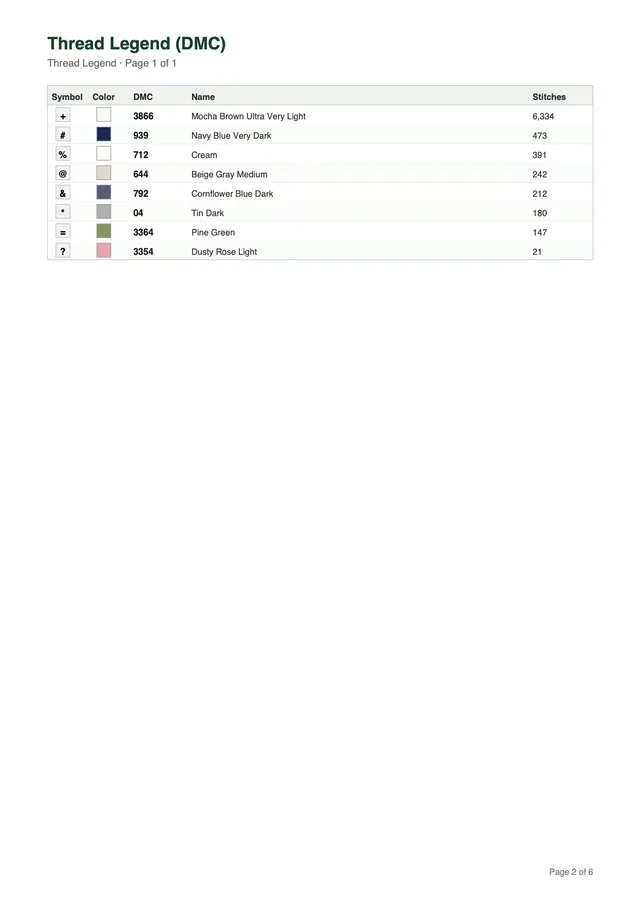
Every generated PDF export comes formatted for your choice of Letter or A4 paper. The document includes a cover page with artwork preview, overall stitch dimensions, total stitch count, and calculated fabric sizes for 14, 16, and 18 count Aida. Dedicated thread legend pages list every DMC number, color swatch, symbol glyph, and exact stitch count. Symbol chart pages feature bold grid lines every 10 stitches, outer coordinate numbers, and an overview minimap.
The pattern maker tiles charts into readable pages measuring 50 stitches wide by 60 stitches tall. For instance, our monogram sample measures 100 by 80 stitches with 8 colors and formats cleanly across 6 printable pages. Because the tiles align to tens, you can follow your needlework across page transitions without losing your place. You can print the pages on your home printer or read the PDF directly from a tablet screen.
Creating a custom monogram cross stitch pattern gives you complete control over personal initials, family gifts, and heirloom linen embroidery. Upload your high-contrast initial graphic, adjust your grid dimensions in the free browser preview, and verify your thread list on our website. You can then download your comprehensive printable PDF chart and begin stitching your bespoke project immediately.
The Cross Stitch pattern maker does not type text, pick fonts, or insert names directly. You must prepare a graphic of your initials in an image editor or scanner, then upload that JPEG, PNG, or WebP file up to 20 MB and 8,000 pixels per side. The browser generator then converts your high-contrast letter shapes into counted full cross stitches.
The Cross Stitch pattern maker does not draw floral frames, wreath borders, or decorative corner flourishes. To include a decorative floral border, you must draw or paste that border into your image before uploading the file. The browser generator then maps both your border and your initials into full cross stitches on the chart.
A single initial works well in a 40 to 60 stitch square, while three initials need 80 to 140 stitches of width. Setting a custom palette between 2 and 8 DMC colors keeps your letter strokes solid and prevents stray confetti stitches. The pattern maker provides color presets of 10, 20, 30, 40, and 50 shades, with custom options from 2 to 50 DMC colors.
The Cross Stitch pattern maker produces charts with full cross stitches only. It does not export backstitch lines, French knots, or fractional stitches. If you want delicate backstitch outlines or specialty knots, you can add them by hand onto your embroidered fabric.
Interactive previews run in your browser at no cost so you can inspect your grid before creating an account. When you sign up with Google, you receive 1 free credit. Generating a new printable PDF pattern costs 1 credit, while repeat downloads of that saved PDF cost nothing.
Transform your personal initials into a polished monogram cross stitch pattern with authentic DMC embroidery floss. Create your graphic, preview the counted chart in your browser, and sign up to download your printable PDF with your free credit today.
Try for freeUpload a photo and see your pattern in seconds. No account needed to preview.